Divi 5 Ready
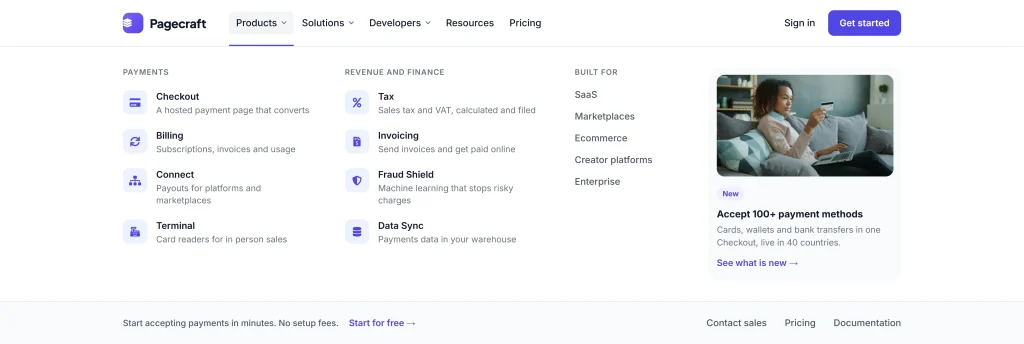
Payments Mega Menu

About This Layout

What's Inside

  • 1 section, 1 row and 172 Groups, laid out with Divi's Flex layout.
  • Modules: Text (108), Button (3), Icon (47), Image (3).
  • 52 native Divi Interactions (22 on click or tap, 12 on page load, 9 on hover, 9 when the pointer leaves), no JavaScript.
  • Entrance animations on 14 elements.
  • A sticky bar that stays at the top of the screen while visitors scroll.
  • Separate tablet and phone settings on 6 elements.

Best For

  • The navigation bar at the top of a site.
  • Fits SaaS and software sites.
  • Suits a light design.
  • Add it to a header template in Divi's Theme Builder and it shows on every page.

How to Customize

  • Colours: White #ffffff, Ink #111827, Indigo #4f46e5. They arrive as global colours when you import, so changing one in Divi updates every module that uses it.
  • Fonts: Inter (500, 600), Plus Jakarta Sans (800). The largest text is Plus Jakarta Sans at 19px.
  • Replace the 3 images with your own in their Image modules.
  • To change what a click or hover does, open that module's settings, Advanced tab, Interactions.
  • Some elements show only at certain screen sizes (Advanced tab, Visibility), so check tablet and phone after you edit.
Live Preview
Layout screenshot

Colors and Fonts